XLNavigator Vertical Tabs for Excel
An Excel Add-In that replaces horizontal sheet tabs with a vertical panel for faster navigation.

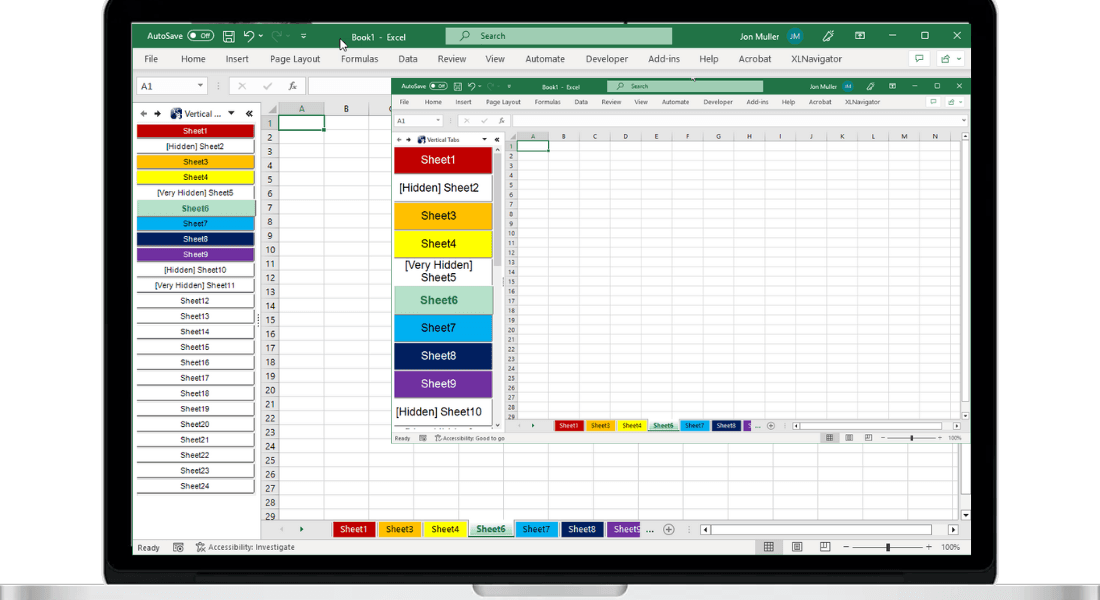
We're excited to announce XLNavigator Vertical Tabs — an Excel add-in that transforms how you navigate workbooks with many sheets. Instead of scrolling through tiny horizontal tabs, you get a vertical panel with search.
It's the navigation upgrade Excel has needed since widescreen monitors became standard.
The Problem
Excel's horizontal tab bar was designed in 1995 for monitors that were wider than they were tall. Today, we have widescreen displays — but Excel still crams sheet tabs into a tiny strip at the bottom.
With 20, 50, or 100+ sheets, you spend more time scrolling through tabs than actually working. Right-click, scroll, squint at tiny names, click the wrong one, try again.
It's 2025 and we're still navigating like it's Windows 95.
The Solution
Vertical Tabs adds a dockable panel to the side of your Excel window. All your sheets are listed vertically — visible at a glance, no scrolling required for most workbooks.
Need a specific sheet? Just start typing. The search filter finds it instantly. Press Enter, you're there. Two seconds to any sheet, regardless of workbook size.
Key Features
- Vertical sheet list — See all your sheets in a scrollable vertical panel
- Instant search — Type to filter sheets by name, jump directly to any sheet
- Dockable panel — Dock to left or right side, or float anywhere
- Sheet management — Right-click menu for rename, hide, delete, and more
- Color indicators — Tab colors are shown in the vertical list
- Hidden sheet visibility — See and access hidden sheets easily
Compatibility
Vertical Tabs works with:
- Microsoft Excel 2007, 2010, 2013, 2016, 2019, 2021
- Microsoft 365 (Office 365)
- Windows 10 and Windows 11
It installs as a COM add-in and integrates directly into Excel's ribbon interface.
Why We Built This
Every modern IDE has vertical tabs. VS Code, Visual Studio, JetBrains tools — they all figured out that vertical navigation is better for large projects. Excel users deserve the same.
After years of right-clicking tab scroll arrows and hunting through sheet lists, I built what Microsoft should have added a decade ago. Simple, fast, effective.
Navigate Large Workbooks Faster with Vertical Tabs
Stop scrolling through tiny sheet tabs. XLNavigator Vertical Tabs displays all your sheets in a searchable sidebar, so you can jump to any sheet instantly.
Related Reading
- Navigate Large Workbooks — tips for complex workbooks
- Why Sheet Tabs Are Broken — the navigation problem explained
- Organize Sheet Tabs — naming and color strategies
- How to Get Vertical Tabs in Excel — detailed vertical tabs guide
Official Resources
- Manage worksheets — Microsoft worksheet guide
- Hide or show worksheets — visibility management
Want more Excel tips like this?
Get our free guide: 10 Excel Shortcuts Microsoft Doesn't Tell You About
Join 3,000+ Excel users boosting their productivity.