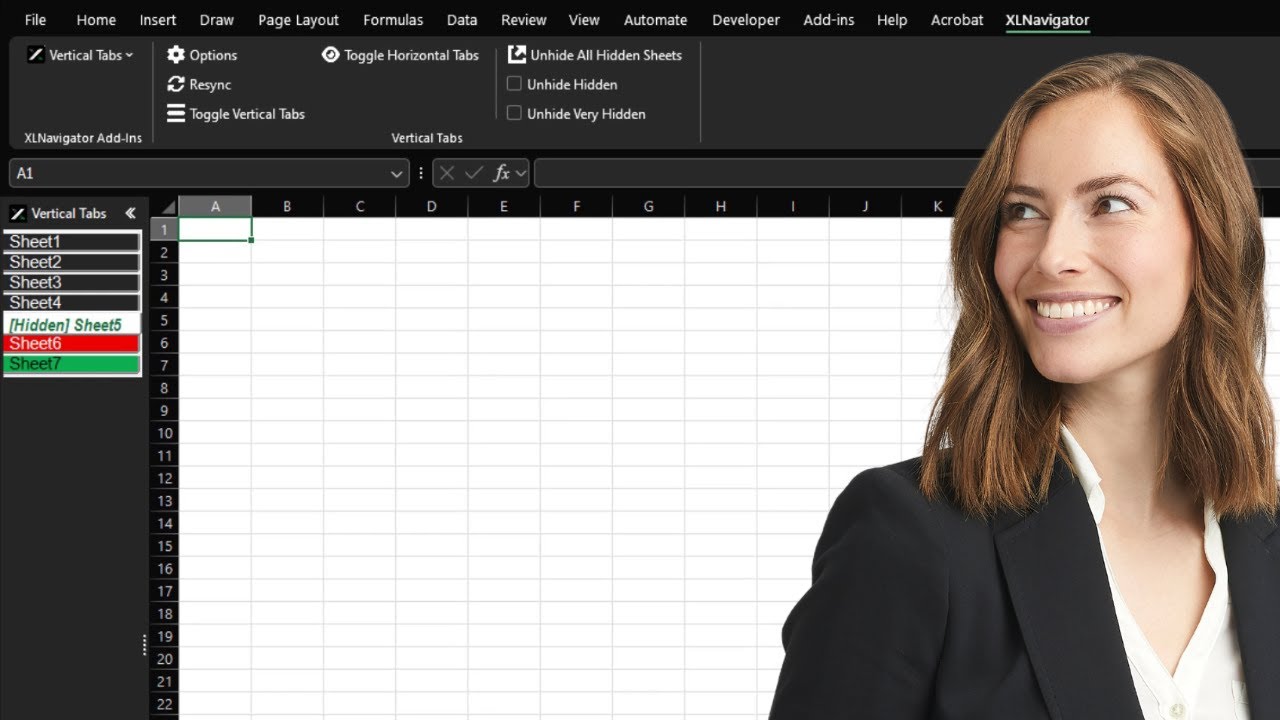
Managing multiple worksheets with horizontal tabs is inefficient and confusing.
Many worksheets to manage
Constant tab scrolling
Lost productivity
Sound familiar? You're not alone.
All you need to manage Excel worksheets efficiently with vertical tabs
- Transform your Excel worksheet navigation with a vertical layout that makes it easy to see and access all your sheets at once.
- Easily see and manage hidden sheets in your workbook. Quickly unhide and very hiddensheets directly from the vertical tabs panel.
- Find any worksheet instantly with the smart search feature. Type any part of a sheet name to quickly locate it.
- Personalize your vertical tabs with custom sizes, colors, and text formatting. Match your horizontal tab colors or create your own style.
Efficient Excel Worksheet Management
Transform how you work with multiple worksheets in Excel. Navigate and organize your sheets with ease using vertical tabs.
Better Sheet Organization
See all your worksheets at once with a vertical layout that makes navigation intuitive.
Hidden Sheet Management
See position of hidden and very hidden sheets, and instantly unhide them with a single click from the vertical tabs.
Quick Sheet Search
Instantly find any worksheet by searching for text contained in the sheet names.
Pricing
Choose Your One-Time Purchase Option
Excel Vertical Sheet Tabs
XLNavigator Vertical Sheet Tabs for Excel Windows Desktop.
$27
USD
- Vertical tabs on left or right side
- Resizable tabs
- Customize for any Excel workbook
- Show hidden and very hidden sheets
- Search for sheets
- Try free for 7 days, no credit card required
- One time purchase, lifetime updates
- 3 Windows Devices per purchase
XLNavigator All-In-One (Complete Version) Excel Add-In for Excel Windows Desktop.
$149
USD
- Excel Date-Picker and Calendar
- Excel Vertical Sheet Tabs
- Excel Object Explorer
- Excel SQL Range Import
- ... and more (coming soon)
- Try free for 7 days, no credit card required
- One time purchase, lifetime updates
- 3 Windows Devices per purchase
3000+ happy users
Ready to get started?
Download now and experience the difference. No strings attached.
Try it free for 7 days
Full access. No credit card required.
3000+ happy XLNavigator users!
Don't take our word for it. Here's what they have to say about XLNavigator.
Really easy to use. The tutorials are really useful and explains how everything works. Working with dates and navigation in Excel is a breeze now!

Having a date-picker calendar on the side in Excel is so convenient when working with dates in Excel. Although setting dates in cells from the calendar is handy, visually seeing corresponding dates on the calendar when selecting cells containing date values is very handy.
FFrancois TredouxXLNavigator is genuinely an incredibly useful addition to Excel. I often receive Excel files with 15-20 sheets or more of financial data from my clients, which I have to review and use in preparing the clients' financial statements and tax returns. The Excel vertical tabs immediately show me all the sheets and even hidden sheets in the spreadsheet without having to scroll one bit, and that is a massive time-saver for me! Feels like a super power! :D
AAltea Muller
The XLNavigator calendar and date-picker have spoiled me, and I cannot go back to typing dates manually in Excel. The resizeable calendar makes planning so easy. Planning, reviewing, and flipping dates in Excel is incredible! 100% worth it 🚀🚀🚀
MMyrna Botha
I love the interactive calendar on the side that lets me pick a date visually and update the selected cells with that date. The calendar can show me a full 12-month view and week numbers, and that is very handy as I plan out training and planning schedules for the upcoming year. I also got spoiled with the vertical tabs that feel more natural to use in Excel.
MMartin PretoriusImporting ad hoc data from Excel into SQL is easy with this tool. I love the option to specify a minimum varchar length and step up in specified increments in varchar length instead of just setting the varchar length to the longest string in Excel. Exporting tables and views are also quick and easy the way it should be
JJulie Machado
Having the sheet tabs in Excel on the side feels natural and is effective for finding and selecting specific sheets, and even in smaller spreadsheets, I see the Excel vertical tabs as my preference. I am not sure why this is not part of Excel out of the box. What's not to love?
RRene ReetzThe ability to quickly select any block of cells of data in Excel and then load it as a new table in SQL Server in no time is beneficial to me. I work with SQL and Excel every day. Trying to import data into SQL Server using SSIS or the import wizard several times daily is frustrating, especially when running into import errors!
FFred Lieb

Jon Muller
"The tool is exactly what I didn't even know I needed."
Selecting a range of data cells and inserting that data selection as a new table into SQL Server on an ad-hoc basis is part of my daily workflow as I do most of my data analysis and database conceptual prototyping in SQL and Excel. Using the SQL Server Import and Export Wizard requires several steps to import data from Excel, and errors can occur during the import process. XLNavigator lets me stay focused on my task rather than going down a tangent trying to get the data into SQL Server. What a simple yet powerful tool!
DDaniel HerbertCombining the Excel vertical tabs on the left side with the horizontal standard tabs makes for an excellent solution to plan out spreadsheet-based content rapidly. I use the handy interactive calendar tool daily for planning dates. I do everything in Excel, and I cannot do so without this amazing add-in.
LLouise Schultz
FAQ
Vertical Tabs Questions
- Instead of scrolling horizontally through dozens of sheet tabs, Vertical Tabs displays all sheets in a sidebar list. You can see more sheets at once, search by name, and jump to any sheet instantly.
- Yes! Vertical Tabs shows hidden and even "very hidden" sheets that are normally invisible in Excel. You can view them, navigate to them, and manage their visibility.
- Simply type in the search box at the top of the Vertical Tabs panel. It filters sheets in real-time as you type, making it easy to find sheets in workbooks with hundreds of tabs.
- Yes, the panel is fully resizable. Drag the edge to make it wider or narrower based on your preference and screen real estate.
- Yes. Vertical Tabs works with protected workbooks and sheets. You can navigate and view sheets normally; protection settings are respected for editing.
Not ready to purchase? Start with our free guide.
Learn 10 Excel shortcuts that'll save you hours every week — completely free.

Save time and increase your productivity
XLNavigator also includes an ever-expanding list of features and functions that make working with data in Excel easier and less error-prone. Hence, you will be less frustrated and more effective using Microsoft Excel.
- Gain situational awareness and security by seeing all sheets, including hidden and very hidden sheets.
- Navigation features like Vertical Sheet Tabs save you time and effort when reviewing and editing the content of workbooks.
- Date functionality like the Calendar Date Picker helps prevent date entry errors and makes you more efficient in reviewing, planning, and working with dates.
- Excel data analysts and power users who use SQL Server and Excel together will benefit from our SQL features and be more efficient and effective in using Excel and SQL together.